Hi TEALS class, I'm writing this post for YOU.
I'm not a huge Java guy but I wanted to write something cool to show how to setup a Java environment with dependencies.
What did I come up with to connect with you? I created another Discord Minecraft bot. yay...
I'll go through both thought-processes for the project and also technical aspects to give a rundown of how I approached an idea and turned it into reality.
Before we get to that, please download this zip file:
https://files.orewa.pw/src.zip
It contains all my Java source folder with all the code we go over today.
Step 0: What should it/I do?
I start every software project by considering what I specifically want it to do.
Some of y'all talk pretty loud and always about Minecraft and Discord (or at least some of you) so it was a pretty easy launch point.
Originally, my idea was I wanted users to be able to see a log of all actions taken in Minecraft easily from Discord.
Step ½: Is this even possible?
This comes with experience/knowing what you're working on. I run a Minecraft server and just starting digging through logs. In another application, we might go through a website's API (such as Yahoo! Finance) but here we can just force our bot to dig through logs.
I couldn't actually find a log of all user actions. It looks like there are plugins for it but I don't have it installed. What I could find was the user connect/disconnect logs. When Minecraft runs, it automatically puts out logs that have sections that look like this:
[2024-01-26 15:38:26:863 INFO] Player connected: playerA, xuid: 1234567890123456
[2024-01-26 15:38:52:103 INFO] Player disconnected: playerA, xuid: 1234567890123456, pfid: ef03492acfbb3a21
[2024-01-26 15:41:50:593 INFO] Player connected: playerA, xuid: 1234567890123456
[2024-01-26 15:42:08:686 INFO] Player disconnected: playerA, xuid: 1234567890123456, pfid: ef03492acfbb3a21
[2024-01-26 15:46:59:125 INFO] Player connected: playerA, xuid: 1234567890123456
[2024-01-26 15:51:24:630 INFO] Player disconnected: playerA, xuid: 1234567890123456, pfid: ef03492acfbb3a21
[2024-01-26 15:56:33:223 INFO] Player connected: playerA, xuid: 1234567890123456
[2024-01-26 15:57:10:434 INFO] Player disconnected: playerA, xuid: 1234567890123456, pfid: ef03492acfbb3a21
[2024-01-26 16:00:25:129 INFO] Player connected: playerA, xuid: 1234567890123456
[2024-01-26 16:03:51:543 INFO] Player disconnected: playerA, xuid: 1234567890123456, pfid: ef03492asscfbb3a21
[2024-01-30 23:08:22:835 INFO] Player connected: player B, xuid: 1234567890123457
[2024-01-30 23:08:40:168 INFO] Player disconnected: player B, xuid: 1234567890123457, pfid: a67b4794acb35809
[2024-01-30 23:11:22:968 INFO] Player connected: player B, xuid: 1234567890123457
[2024-01-30 23:11:34:061 INFO] Player disconnected: player B, xuid: 1234567890123457, pfid: a67b4794acb35809
[2024-01-31 01:06:37:799 INFO] Player connected: playerA, xuid: 1234567890123456
[2024-01-31 01:07:13:208 INFO] Player connected: player B, xuid: 1234567890123457
[2024-01-31 01:07:21:413 INFO] Player connected: Player C, xuid: 1234567890123458
[2024-01-31 01:08:44:975 INFO] Player connected: Player D, xuid: 1234567890123459
[2024-01-31 02:28:38:116 INFO] Player disconnected: playerA, xuid: 1234567890123456, pfid: ef03492acfbb3a21
[2024-01-31 02:28:38:254 INFO] Player disconnected: Player D, xuid: 1234567890123459, pfid: 4b6be430457f31d
[2024-01-31 02:28:58:691 INFO] Player disconnected: Player C, xuid: 1234567890123458, pfid: b3d2cb5372fe5cfd
[2024-01-31 02:28:59:476 INFO] Player disconnected: player B, xuid: 1234567890123457, pfid: a67b4794acb35809
Player connection logs
Player names and xuids (Xbox user IDs) have been modified for privacy's sake. They're also formatted differently so we can take care of edge cases such as whitespace in the logs. I manually grabbed these logs but I could probably quickly put these logs in an updating file for my bot to see. But for building the bot, I just put this in an input.txt file to test with.
From here I decided to write a bot that took a username or xuid and returned the amount of time they've spent playing on my server.
Step 1: Setup 🪦
This took me forever. I hate this. Let me explain what I have as my dev setup.
The underlined title of the bullet is a link for installation on Windows. I use Debian Linux but if you need help installing, let me know.
- Visual Studio Code: This is one of the defacto text editors today with many extensions to make it very powerful. I do all my coding here. For this project I also installed the Java extension just for some nice-to-have quality of life stuff like better autocomplete.
- JDK (Java Development Kit): I know this part has been confusing to some people so I'll clarify the different downloads a bit (I'm slightly summarizing this article):
- JVM - Java Virtual Machine: A program that's able to translate bytecode into machine code. We don't need to download/run this at all individually
- JRE - Java Runtime Environment: This is an environment that you can download to run Java programs. JVM is a part of the JRE. If you download this, you can run
javacommands in the command line to run compiled Java programs. - JDK- Java Development Kit: This is what we actually want to install and comes with a compilers, tools, etc. It also comes with JRE so you'll be able to run what you make.
- OpenJDK: OpenJDK is a community/open-source version of JDK. I use this personally because I think I found a tutorial to install it for Linux but should work exactly the same as Oracle's JDK.
- Maven: This is a build tool that also helps you manage dependencies. If you don't have dependencies on outside libraries/packages, you probably don't need this. Since we're going to be using an external library to package our program into a
.jar(Java ARchive file/executable) and use a Java-based Discord package, it will be helpful in this instance. There are other alternatives that can do similar things such as Ant or Gradle but I remember hearing someone talk about Maven and I didn't feel like learning the other two so here we are. - JDA (Java Discord API): This is the library I use for communicating/building my Java bot. They have a couple good examples I based my code off of, especially the SlashBotExample. They also have a decent wiki with helpful visual examples. It's an open-source library so you can see how they implemented it but my quick overview is that it's a wrapper library that basically abstracts API calls to Discord servers so we can easily use pretty objects and methods.
NOTE about PATH/environment variables: So in operating systems when you go into a command line and try to execute something, there is a set amount of places it checks for an executable that's getting called. If you don't put your executable in the right place or add the executable's location to your PATH, when you run java in the command line, it won't do anything.

Step 1½: Sanity checking
After installing, we should make sure that everything works.
- JDK: If running
java --versionorjavac --versiongives you something, we're in business. - Maven: If running
mvn --versiongives you something, we're good.
Don't worry about JDA for now. VSCode should be a normal application so I trust you can find it.
Step 2: Creating the project/pom.xml
Not gonna lie, it took me a solid hour to get it installed even to this point. Luckily for you, I took many hours getting dependencies and builds to work but now you get to shortcut it while I explain it. But I will force you to read about all the mistakes I made so you can work through my thought process.
First I just tried to create a "hello world" project. I was able to do that pretty easily and compile it with javac and run it with java (and some code I took from the internet).
I just created a "hello world" class and function, ran javac hello.java and then java HelloWorld to run the program.
class HelloWorld {
    // Your program begins with a call to main().
    // Prints "Hello, World" to the terminal window.
    public static void main(String args[])
    {
        System.out.println("Hello, World");
    }
}
Yet another hello, world. Literal copypasta.
At this point I realized I had no idea how dependency management/importing libraries worked for Java. That's when I finally realized that was what Maven was for.
I tried some dumb things like trying to create my own pom.xml and using it with Maven. What is pom.xml? I'm glad you asked, I have such a great segue.
pom.xml is a file that tells Maven what to build, what dependencies we have, and some other metadata (random info).
I then found this handy-dandy Maven in 5 Minutes article by the Maven creators themselves. By using deductive reasoning, I ended up modifying their command to something I wanted:
mvn archetype:generate -DgroupId=com.patrick.app -DartifactId=mcbot -DarchetypeArtifactId=maven-archetype-quickstart -DarchetypeVersion=1.4 -DinteractiveMode=falseRealistically, all I changed was the groupId and artifactId to be less generic. Everything else was default.
In the end it gave me the folder structure as shown in the article. Now I had a project! I ran mvn package and java -cp target/mcbot-1.0-SNAPSHOT.jar com.patrick.app.App and I saw hello world! Very cool. At this point, I was still just doing tutorial stuff.

Step 3: Writing a bunch of code without knowing if it would work
NOTE: This is where I go through most of the code in the aforementioned zip file. It should be in the src folder. Follow along with the files to read more notes on decision making and to look at the actual code/logic.
I didn't know how to get dependencies to work and I was starting to get annoyed trying random stuff so I just started writing code. I'm at the point where I can mostly sus out my code from my initial idea and debug it later. I just used a bunch of the example code as a jumping off point. With a lot of Googling and decision making, I was able to come up with the following files:
App.java: this is just the main file. Most of this is based off JDA'sSlashBotExampleI linked above. I also use aFileReaderobject here to read my input text file.LogParser.java: This holds theLogParserclass which has astaticfunction that can parse a single line of my log into aConnectionLogobject.ConnectionLog.java: This is the actual object class forConnectionLog. It's pretty basic and stores the following members:public enum ConnectionStatus: Enums are basically just ways to have some special variables map to specific values, usually numbers starting from 0. Here's an article about them. Hilariously, I don't even use this right now with the code but could be used later.- A constructor that takes in and stores:
String name: The user's IGN.String xuid: The user's Xbox ID. This is part of the log and I wanted to give the option to lookup by this since it's unique, unlike usernames.ConnectionStatus status: Whether the log was forCONNECTEDorDISCONNECTED. (Ends up being unused).LocalDateTime time: The timestamp for the log.
- All the members are set to
privatewithpublicget methods and no set methods. I wanted the constructor to be the only way to set the values and only cared about getting the values later.
CollectionLogAggregator.java: This file might sound really verbose but Java is notorious for having a data structure for everything. I found out anAggregatoris a class that has functions that act on aCollection(or in my case aList). It has:- A constructor that takes in a
List<ConnectionLog>where the list is all theConnectionLogs we parsed from the file. public getTimePlayedByName/Xuid: These are 2 functions that basically do the same thing. They get their matchedConnectionLogs and pass them into a function that gives back theDurationbased on that.
- A constructor that takes in a
private getConnectionLogsByName/Xuid: These 2 functions filter through all the logs and find the specific logs that are associated with the name/xuid.private getTimePlayedFromLogs: Takes in anyList<ConnectionLog>and gives you aDurationobject sum of all the differences betweenCONNECTEDandDISCONNECTED.- I originally also had a
CollectionLogBuilderclass that would be able to give you an object based on if you had the username or xuid but I realized later that every log literally had both so I would never have the chance to use this. So I deleted the file 😦
I have left extensive comments in the code so you can see my thought process/understand what the code does.
Step 4: Now I have this code... now what?
This is where a LOT of Googling happened. I know how to write code but I didn't know how to compile it or run it. I also hadn't installed the dependency.
I found some random stuff on Google that told me to add this code to my pom.xml to pull in/install the JDA library during the packaging process:
  <repositories>
    <repository>
      <id>jitpack.io</id>
      <url>https://jitpack.io</url>
    </repository>
  </repositories>

<!-- AND -->

    <dependency>
      <groupId>com.github.discord-jda</groupId>
      <artifactId>JDA</artifactId>
      <version>v5.0.0-beta.20</version>
      <exclusions>
          <exclusion>
              <groupId>club.minnced</groupId>
              <artifactId>opus-java</artifactId>
          </exclusion>
      </exclusions>
    </dependency>
Some random code I found on the internet
Then I tried ye old faithful mvn package then ran java -jar <filename>.jar and lo and behold I got a bunch of errors that basically amounted to "You don't have JDA installed". At this point I just banged my head against a wall a bunch of times, tried compiling it and rerunning to no avail.
Then I found an article that said that I needed to use some random "shade" plugin. I haven't really needed to use something like this in other projects but apparently this was a thing in Java. It adds the dependency library's code into the jar I had so I can run just one jar file with java simply. So I stole borrowed some code snippets and ended up with this snippet in my pom.xml:
        <plugin>
            <artifactId>maven-shade-plugin</artifactId>
            <version>3.2.1</version>
            <executions>
                <execution>
                    <phase>package</phase>
                        <goals>
                            <goal>shade</goal>
                        </goals>
                        <configuration>
                <transformers>
                    <transformer implementation="org.apache.maven.plugins.shade.resource.ManifestResourceTransformer">
                        <mainClass>com.patrick.app.App</mainClass> <!-- You have to replace this with a path to your main class like my.path.Main -->
                    </transformer>
                </transformers>
                <createDependencyReducedPom>false</createDependencyReducedPom>
            </configuration>
                </execution>
            </executions>
        </plugin>
Some more random code. The only thing I changed was my "main class". I don't totally know how this works.
You may be getting the gist that I have no idea what I'm doing. This is true. I was cobbling a bunch of code together. But in software engineering you learn by trying things out, reading other people's code, and other people telling you your way sucks.
I'm sure that my code and configurations suck in someone else's eyes but as one engineer to another they'll at least somewhat respect that it works. Try to remember this when you worry about having perfect code. I'll dive more into my philosophical take on being a software engineer later.
But after these changes I was finally able to package it with mvn package and run it using java -jar <my-api-key>!
Step 5: Man, it didn't work 😦

Ah yes, we were able to package it and it actually connected to Discord!
But whenever I ran the command, it broke or didn't give me the right answer. And I would fix something and it would break again.
So I started debugging. I can go further into detail but this is the list of things I had to fix that I can remember:
- My regex wasn't working for lines that ended with the
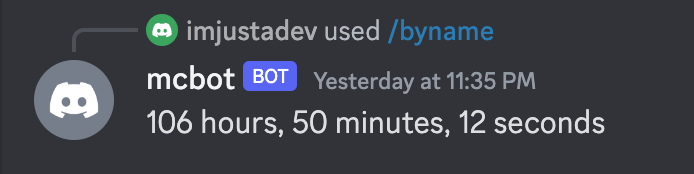
pfid(which also wasn't used) so I was getting 106 hours of gameplay since it would skip a couple logs and calculate the time between the 5 days of me logging out and logging back in.
- I also got 0 hours because I accidentally put the
nameandxuidoptions on the wrong slash command so it wasn't actually getting anything as an input. - I got the filtering function wrong so it was also giving me 0 hours after I fixed the previous bug.
- I didn't find out that my timestamp from the Minecraft wasn't in the format needed by the
LocalDateTime.parse()function so I had to reformat it.
You may be asking, "Hey, how the heck did you figure out what was wrong and how to fix it?" My answer is it is the combination of:
- I've seen similar-ish errors.
- I had a lot of
System.out.printlnstatements to help me figure out what was happening at different parts of the application/if I was even reaching certain places. - A lot of Googling.
But in the end, after tons of debugging...
Step 6: Profit!
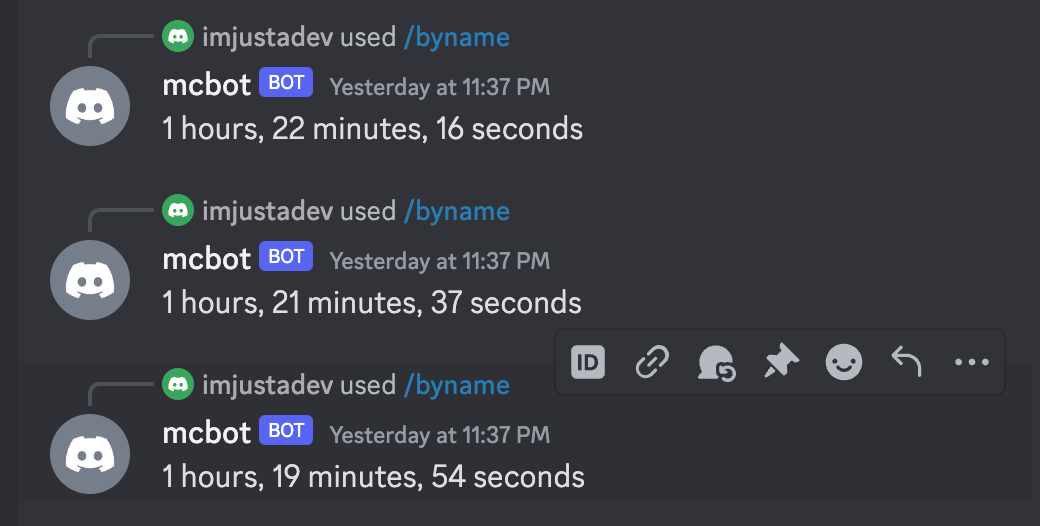
Here's a screenshot of it working:
Step 7: You thought I was done?
Now that I was done, I'm done right?
... not really.

So that previous screenshot was kind of a lie. I figured out how to get it to work if I DM'd the bot directly but I haven't figured out how to do it so I can call it from any server it's invited to and from any random channel.
So the previous paragraph was also kind of a lie. After eating dinner and coming back to my computer, it turns out the channel was finally able to pick up the commands and work on a server channel and not just through DMs! Success!
But that functionality aside, I also wanted to refactor the code. Refactoring is the act of taking your code and cleaning it up. It can be renaming variables, making duplicate code into functions, etc.
There's no such thing as perfect code but it's a good learning opportunity of looking through your first (or fiftieth) draft and trying to improve it to a "final" draft.
A couple examples of the refactors I did:
- I removed a bunch of unused code lol
- In
ConnectionLogAggregator, thegetTimePlayedByXuidandgetTimePlayedByNamewere both kind of big and had a lot of duplicate code. I decided to move the duplicate code out into its own function which ended up beinggetTimePlayedFromLogs
This isn't a huge project and I'm not doing it professionally but there's definitely more refactors I could do and cleaner code I could have wrote but this was my approach.
Conclusion
There we go! That was my adventure learning how to set up Java, Maven, and an external library! It was hard but I figured it out and hopefully you got a glimpse of how a software engineer might think. But we all think differently so I guess you only saw how I think.
But I want you to hopefully have the following takeaways (if I did a bad job explaining, I will try to make edits here or explain to you directly):
- How to set up Java locally (and Maven if needed) so you can run stuff at home.
- No one knows everything and have to Google a LOT of stuff. With repetition and pattern recognition, you might be able to not Google as much but sometimes I still need to remember how to get the length of a list/string.
- There is no one or perfect solution to any software problem. There are better and worse ones but I can guarantee you'll be hard pressed to do it the first time too. Write something that works and then you can work on making it better.
- Speaking of making things better, learn early how to write code that works and refactor it. Getting it working first is important for learning and then try to clean it up later.
- Going into a project with some kind of high-level idea of how you want it laid out will help you save time. I spent some time thinking about what my application needed to do and was able to glue them all together rather than just randomly typing. Learning how to lay things out comes with experience.
- Making mistakes and writing extra stuff that is unnecessary is natural. I wasted so much time writing random code and trying random stuff that didn't actually do anything. I've learned from many mistakes and detours and make less of those mistakes and waste less time since I can see further out that something isn't going to work. But I still waste time because I'm not perfect 🤠
- Software engineering is built on the shoulders of giants and they're so giant we can't always see everything they saw. What I mean is for me, one of the beautiful parts of software engineering is I can do awesome things without knowing exactly what everything does. This can be dangerous but also can help you do a lot of things quickly. As long as you trust where the code comes from, that's the best we can ask for.
This is over 3,400 words. I haven't written this much since college. Hope you enjoyed 😃
Good luck hacking!
Editors note: Big thanks to TH for editing/reading over this. Couldn't have done this without your help, bud!